the local-first audio knowledge base
Ask your recordings anything.
None of it leaves your machine.
Drop in the interviews, depositions, client calls, and source tapes you already have. Kajo transcribes them, labels who spoke, and answers your questions with quotes that take you to the second they were said — on your own Mac, Windows, or Linux computer.
Try the core loop on 5 files or 150 minutes of audio — no card, no upload, no signup wall.
- 99 languages
- Speaker labels
- Cited, checked answers
- Works offline
- Mac · Windows · Linux
Waitlist
Be first to know
Kajo Voice launches on October 10, 2026. Leave your email and we will send one message that day — while Lifetime is $49 for the first two months, before it goes to $99.
How it works
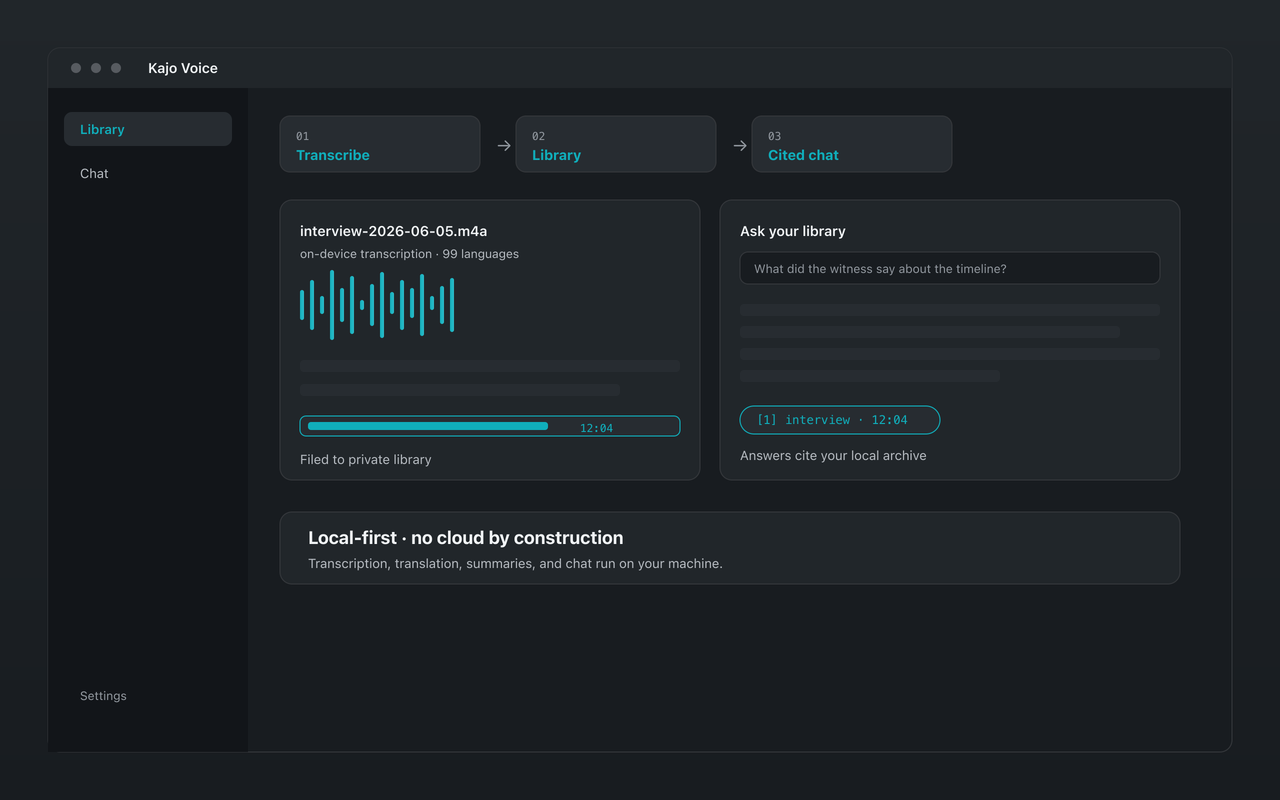
Three steps, all on your machine
Drop files in, and the rest happens locally: a transcript with speakers, a private library, and answers that cite the moment they came from.
Cited chat
Answers you can check, not just read.
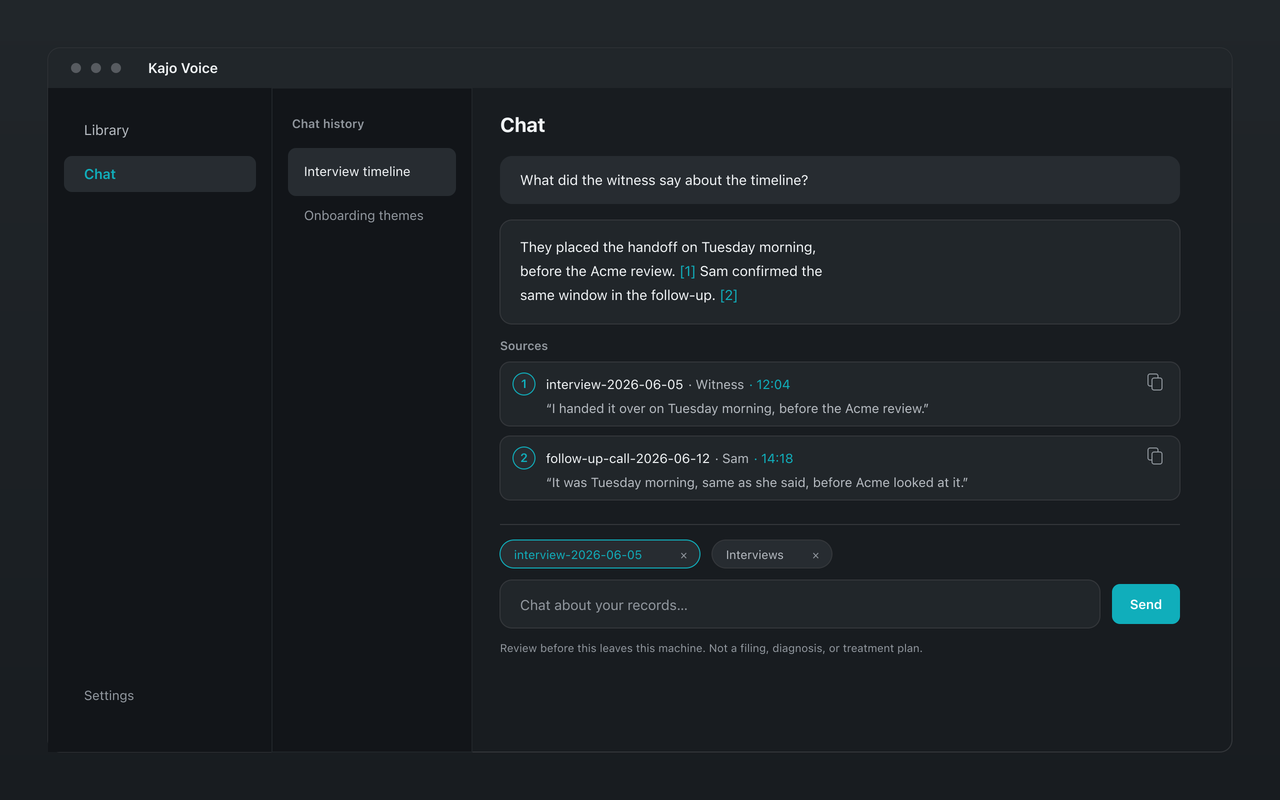
Pin a folder — a study, a matter, a client — and ask it a question. A local model answers from those recordings only, and shows you where the answer came from.
- 1
Scoped to the folder you pin
Ask this folder from the library, or pin folders and recordings yourself. The whole library is searched only when you confirm it, so one client’s recordings never end up in another client’s answer.
- 2
Every citation opens the moment
Each source card names the recording, the speaker, and the timestamp, with the quote itself. Click one to open the recording at that second, or copy the quote with its speaker and source for your memo, report, or slide.
- 3
Checked quotes, honest gaps
Every citation's quote is matched word for word against the transcript, and one that does not match is dropped. When your recordings do not support an answer, Kajo marks it “No supporting evidence in your sources”.
One click for the jobs people actually run: Summarize · Themes · Find the quote · Quote sheet · Who contradicted whom · Draft from citations.
Who it’s for
Built for recordings that cannot go to the cloud
For people whose archives are bound by an ethics approval, privilege, a client contract, or a promise to a source — and who still need answers from them.
-
Researchers & analysts
Interview studies that must stay on approved hardware: transcribe on-device, ask the study folder with citations, and export QDPX for NVivo, ATLAS.ti, or MAXQDA.
-
Lawyers
Depositions, witness interviews, and client calls, filed by matter and asked with citations — with no transcription vendor ever holding a copy.
-
Consultants
Client calls and expert interviews, filed by engagement and asked with citations — the quote goes straight into the deck, the audio never leaves your machine.
-
Journalists
Years of source tape you can search and ask with citations, in any of 99 languages — and wipe yourself when a source needs protecting.
-
Therapists
Consented session recordings, transcribed and reviewed on the computer in your office — never uploaded, and deleted when you decide.
-
All use cases
What each role does in Kajo, job by job — and what it deliberately does not do.
Why Kajo
Private and useful, on your own machine.
Cloud tools answer questions about your recordings by keeping them. MacWhisper and Superwhisper keep your recordings private, but answer one transcript at a time, if at all. Kajo does both jobs on your machine.
-
Cloud notetakers and transcribers
Otter · Fireflies · TurboScribe
Useful answers — but your recordings are processed and kept on someone else’s servers, some send a bot into your calls, and the subscription renews for as long as you use them, often per seat.
-
Local transcription apps
MacWhisper · Superwhisper
Private, and good at the transcript itself. Kajo keeps going: answers cited to the moment across a whole folder, QDPX export for research tools, and the same app on Linux.
-
Kajo Voice
Mac · Windows · Linux
Private and useful: transcripts, speaker labels, and translation, filed into a library that answers your questions with citations — on your own machine, for one payment.
The short version
Three reasons Kajo exists
-
Private by architecture
Your recordings never leave your machine.
Recordings are transcribed on-device, and speaker labels, translation, search, and chat run there too. There is no cloud-processing path to switch on — once the models are downloaded, the whole loop works with the network unplugged.
-
Cross-platform, including Linux
Mac, Windows, and Linux — one product, three operating systems.
Native apps for all three, with the same core loop on each; Windows installs from the Microsoft Store. Linux gets .deb, .rpm, and AppImage builds for x86_64 and ARM64 — a first-class build, not an afterthought.
-
Cited chat
Ask a folder of recordings. Check every answer.
A local model answers from the folders or recordings you pin — the whole library only when you confirm it. Citations jump to the exact moment in the recording, each citation's quote is matched against the transcript, and when your recordings do not support an answer, Kajo marks it as unsupported.
Pricing
Free to try. Lifetime to keep.
Pay once — $49 through December 9, 2026, and $99 after that. No subscription.
Free
$0 to start
5 files or 150 minutes of audio — total, for life. Core loop (transcribe, translate, summarize, chat), no card, no upload.
Lifetime
$49 Standard price $99 one-time
Launch price — $99 from December 10, 2026.
Everything in Free with no caps: unlimited imports, plus watch folders, batch export. No subscription — your installed version keeps working forever.
Questions people ask first
Does anything leave my computer?
Not your recordings, transcripts, or library. Transcription, speaker labels, translation, search, and chat all run on your machine, and there is no cloud-processing path to switch on. The app itself uses the network for the one-time model download, licence activation and a check, at launch and once a day, that the licence was not revoked, update checks, crash reports and usage analytics only if you agree to send them, and feedback only when you send it — none of them carries your audio or text.
What recordings does it work with?
Any audio or video file you already have — interviews, depositions, client calls, field recordings, session tapes. Kajo transcribes 99 languages on-device, labels up to eight speakers per recording, and translates transcripts into 59 languages. It has no meeting bot and never joins a call: you import the files.
How accurate are the transcripts and the answers?
Transcript quality depends more on the recording than on the model — a close microphone and a quiet room matter most — so try it on your own audio with the free allowance before you pay, and correct any segment in place. In chat, answers cite the recording and timestamp they came from, each citation's quote is matched against the transcript, and when your recordings do not support an answer, Kajo marks it as unsupported.
What do I need to run it?
An Apple Silicon Mac (M1 or later) with macOS 14.0 or later; a Windows PC with Windows 10 (21H2 or later), or Windows 11 version 24H2 or later on ARM; or a Linux desktop running GNOME Keyring or KWallet. Any of them needs 16 GB of RAM, and a PC's Intel or AMD processor needs AVX2 (4th-generation Core or Ryzen and newer). Setup downloads ≈7 GB of models once, before first use; everything runs offline afterwards.
What does it cost?
Free for 5 files or 150 minutes of audio — total, for life, with no card and no account. After that, a single payment unlocks unlimited imports and the Lifetime extras (watch folders, batch export). It costs $49 through December 9, 2026, and $99 after that. There is no subscription, and your installed version keeps working forever.
Is it a meeting recorder or a notetaker?
No. Kajo never joins a call, records a meeting, or listens in the background. It works on recordings you already have: import them by hand, or on Lifetime point a watch folder at the directory your recorder or call software saves to. If you want live meeting notes shared with a team in a browser, a cloud tool such as Otter or Granola is built for that.
Trust
There is no cloud option. Verify it yourself.
Once the models are downloaded, turn off Wi-Fi and run the whole loop — transcription, speaker labels, translation, and chat keep working. Then read exactly what runs on your machine, and the short list of things that ever touch the network.