Chat
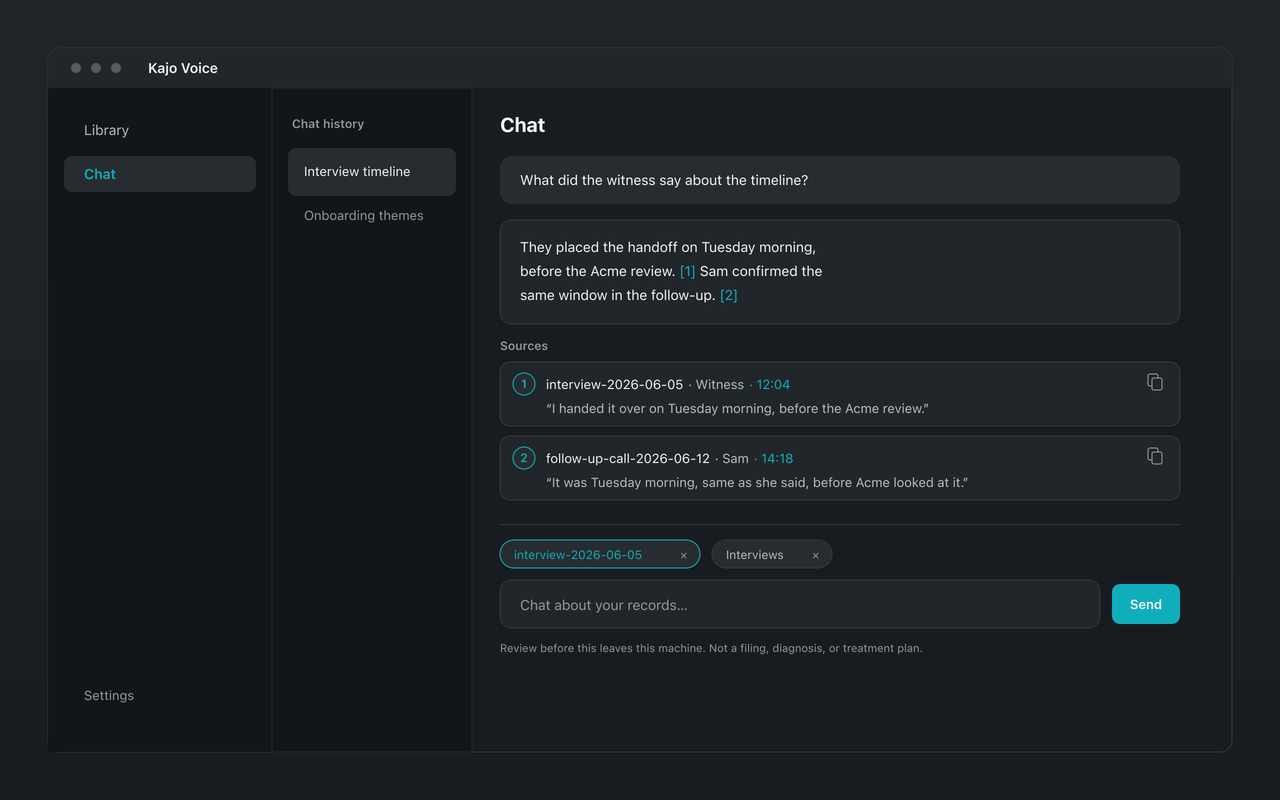
Ask a folder of recordings.
Check every answer.
Pin a study, a matter, or a client's folder and ask it anything. A local model answers from those recordings only — with citations that jump to the exact moment, and a plain “no supporting evidence” when the answer isn't there.
Replace the stack. Pay once.
A common cloud setup pays one service to transcribe the recordings you already have and another to keep and query them, every month. Kajo bundles transcription, a searchable library, and cited chat for a single $49 payment — on Mac, Windows, and Linux, with nothing leaving your machine.
| Tool | Listed /mo |
|---|---|
| TurboScribe Unlimited — cloud file transcription, billed monthly | $20.00 |
| Otter.ai Pro — cloud meeting notebook with AI chat, billed monthly | $16.99 |
| Example stack total, billed monthly | ~$36.99 |
| Kajo (transcribe + library + chat) | $49 once |
List prices read from each vendor's pricing page on 2026-10-04. Your stack may differ — the point is that a recurring cloud stack bills every month, while Kajo is a single $49 payment that unlocks unlimited imports and Lifetime convenience (watch folders, batch export), on-device. At ~$36.99/mo, the stack passes Kajo's one-time price in about 2 months — then keeps charging.
What you get
Scoped to what you pin
Ask this folder from the library and the chat starts there; pin more folders or single recordings with @. Answers come from those sources only. Searching the whole library is an explicit confirm — so one client's recordings never end up in another client's answer.
Citations that open the moment
Every citation is a source card with the recording, the speaker, the timestamp, and the quote; click it to open the recording at that second. Copy a quote with its speaker and source in one click, or export the whole answer, quotes included, to Markdown or DOCX.
Checked quotes, honest gaps
Every citation's quote is matched word for word against the transcript, and one that does not match is dropped. When your recordings do not support an answer, Kajo marks it “No supporting evidence in your sources”. And before you ask about a recording whose speakers are still “Speaker 1” and “Speaker 2”, Kajo asks you to name them, so answers can quote people by name — or choose “Ask anyway”.
Starters for real jobs
One click runs the jobs people bring: Summarize, Themes, Find the quote, Quote sheet, Who contradicted whom, and Draft from citations. Type anything else — a brief before the next interview, the strongest quotes on a topic, who said what — and Kajo picks the job that fits.
Dates that mean something
Questions like “since March”, “the last six sessions”, or “2022 versus 2025” use the date each recording was made, read from the file — not the day you imported it.
A local model, and no cloud tier
Full-text and semantic search find the passages, a reranker orders them, and a local Gemma 4 model writes the answer from them — all on your machine. There is no cloud model to switch on and no API key to paste.
What it will not do
- Know anything you have not imported. It answers from your recordings, not from the web or the model's general knowledge.
- Replace reading the source when the stakes are high — the citations are there so you can check.
- Draw legal, medical, or diagnostic conclusions. The chat reminds you, under the question box and in every exported answer, to review before anything leaves your machine.
- Mix clients by accident. Nothing outside your pinned sources is searched unless you confirm the whole library.
Frequently asked questions
Does Kajo Chat send my transcripts to a cloud model?
No. Retrieval and generation both run on your machine — there is no Kajo cloud model and no API key. Your audio and transcript text never leave the computer.
Can I trust the answers?
Trust them the way you would trust a research assistant who shows their work: answers point to moments you can play, quotes are checked against the transcript, and gaps are called out instead of filled in. For anything that will be published, filed, or acted on, read the cited passages — that is what they are for.
How is this different from Gemini Notebook (formerly NotebookLM)?
Google's notebook is free and cites its sources well, but it works in Google's cloud, caps how many sources a notebook holds, and turns audio into one more text source, transcribed in the cloud. Kajo is built for recordings — transcripts with speakers, a library, cited answers — and all of it stays on your machine; Lifetime removes the import cap.
Is cited chat limited on Free?
Cited chat is part of the Free core loop. Free is limited by 5 files or 150 minutes of audio — total, for life, whichever comes first — not by a question meter. A single $49 purchase unlocks unlimited imports and Lifetime convenience (watch folders, batch export).
What happens when my recordings cannot answer?
Chat marks the answer “No supporting evidence in your sources” instead of guessing. Citations whose quotes do not match the transcript are dropped, and in a chat about one recording, a question about someone no speaker is named as gets that answer too, with a “Name speakers…” button.