Kajo for Lawyers

Legal transcription that stays
on your machine.

Kajo transcribes client meetings, depositions, and case notes on your device. Lifetime unlocks unlimited imports, watch folders, and batch export. Attorney-client privilege is non-negotiable. So is data sovereignty.

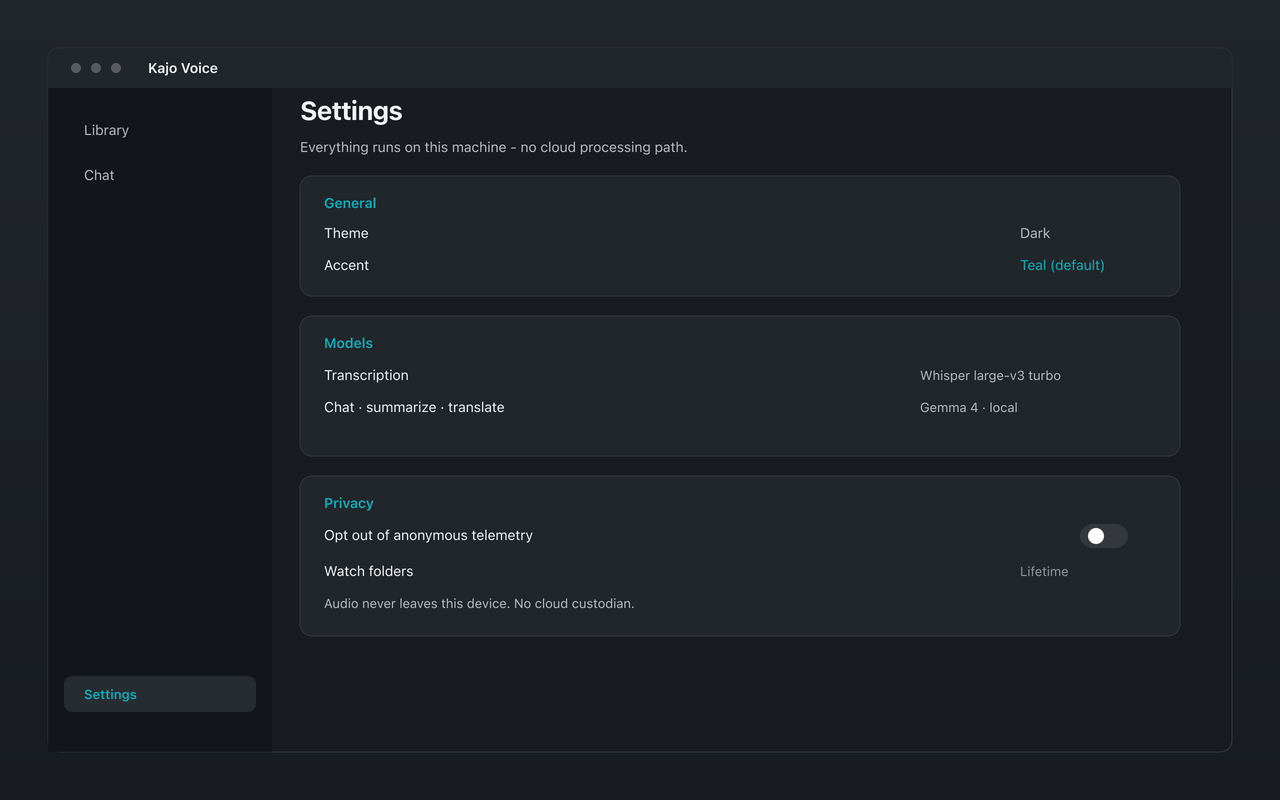
Kajo Voice settings with local privacy controls for legal work
Audio never leaves the device — no third-party custodian to argue about.

Workplace and HR investigators, mediators and arbitrators, and claims investigators who record statements run the same matter-folder loop — the receipt, the brief, and who said what.

The jobs

Find the receipt in this matter

File client calls, witness interviews, deposition video, and hearing audio into a matter folder and pin it. Ask surgical questions — when did she first mention the addendum, did he ever deny receiving the email — and get the quote, the speaker, and the time, or an honest abstention. A six-hour deposition is one file; 'every time he mentioned the addendum' covers all of it.

Brief the next conversation

The hour before a deposition, hearing, or client follow-up, the Brief starter produces a one-page briefing from this matter only: who is who in this folder, open threads, promises, contradictions. No biography from the model's general knowledge.

Reconcile who said what, and when the story changed

Label speakers — Opposing counsel, Witness A — before you ask. Who contradicted whom builds the disagreement from timestamps the archive actually has and dates spoken on tape, never from an inferred calendar.

Draft an internal memo section from evidence

A first draft of a memo section — never a filing — with citations and a quote list, exported to Markdown or DOCX. You edit; the model does not complete a legal conclusion from world knowledge.

Ingest received audio into the matter

Drop in a recording someone else made, or point a Lifetime watch folder at your recorder's export directory. Transcribe, name speakers, file, then run the jobs above. No meeting bot.

Client communications stay on your device

Kajo Voice transcribes on-device on your Mac, Windows, or Linux machine. No audio, no transcript, no AI summary is uploaded to any server. Privileged communications never leave your hardware — there is no third-party custodian.

DPA and privacy attestation for your firm

After Lifetime purchase, execute a GDPR-compliant Data Processing Addendum — template at /legal/dpa, request via privacy@kajovoice.com. Audio and transcripts never leave the device by architecture; see /trust and /security, or request a privacy attestation by email. Translation, summaries, and chat all run on-device — there is no cloud-processing path. Consult your data protection officer for jurisdiction-specific requirements.

Lifetime convenience surfaces

Lifetime unlocks unlimited imports plus watch folders and batch export. Per-file transcript export (Markdown, JSON, DOCX, QDPX, and more) is available on Free within the allowance. For DPA and compliance documentation, contact privacy@kajovoice.com.

Transcribes 98 languages on your laptop — all on-device. International arbitration, cross-border transactions, and multilingual depositions are handled locally. Translation runs on-device with Gemma 4 — offline, with no cloud translation path.

Kajo vs cloud transcription tools for lawyers

Feature Kajo Otter.ai Rev
On-device (no audio upload)
Content stays on your machine ❌ Hosted on AWS in the United States; no EU residency option ❌ Cloud
DPA available ✅ On request after Lifetime ✅ Data Processing Attachment built into the Terms of Service (Appendix 1) ✅ Published Data Processing Addendum for all customers
Privacy by architecture (no cloud path)
Watch folders & batch export ✅ Lifetime
Transcription languages 98 6 languages (English, Spanish, French, German, Japanese, Simplified Chinese) 57+ languages (Rev AI async API)
Works fully offline
One-time payment (no subscription) ✅ $49 once

Setting up Kajo for your law firm

  1. Download Kajo for Mac, Windows, or Linux at /download — free, no account required.

  2. Unlock Lifetime ($49 one-time) for unlimited imports, watch folders, and batch export.

  3. Request your DPA via privacy@kajovoice.com after Lifetime purchase (template: /legal/dpa). Everything runs on-device — no cloud regions to configure, no client content leaves your machine.

  4. Import your first client meeting or deposition recording — drop the file in, or point a Lifetime watch folder at your recorder export directory.

  5. Review the on-device summary and export the transcript to your preferred folder.

Attorney-client privilege and AI tools: the data custody question

Most AI transcription services upload your audio to cloud servers. Under most jurisdictions’ attorney-client privilege rules, transmitting confidential client communications to a third-party cloud provider — even a service provider — creates privilege waiver risk. The question of whether a cloud transcription service constitutes a “necessary agent” under the Kovel doctrine is unsettled and jurisdiction-dependent. Kajo eliminates the question entirely by keeping all audio and transcripts on your local device. There is no third-party cloud custodian to worry about, no subpoena target other than your own machines, and no data custody chain that a sophisticated opposing counsel can challenge.

Three reasons legal teams choose Kajo

  1. Local-first / private by default

    Your audio never leaves your laptop.

    Audio is transcribed on-device — there is no cloud-processing path. Private by architecture.

  2. Cross-platform, including Linux

    Mac, Windows, and Linux — one product, three operating systems.

    Native installers for all three. Linux is a first-class target, not a port — the only local audio knowledge base that takes it seriously.

  3. Cited chat

    Ask questions across your archive — get cited answers.

    Chat with your entire library using a local model. Every answer links back to the exact moment in the recording — no copy/paste.

Free

5 files or 150 minutes of audio — total, for life. Core loop (transcribe, translate, summarize, chat), no card, no upload.

  • Transcribes 98 languages on your laptop — all on-device.
  • On-device translation and summaries — no cloud-processing path
  • Private searchable library — full-text + semantic search
  • Folder organization
  • Cited chat across your archive
  • Per-file export (SRT/VTT/TXT/MD/DOCX/PDF/QDPX and more)
  • Mac, Windows, and Linux

Lifetime — $49 once

  • Unlimited files and minutes
  • Unlimited retrieval index
  • Watch folders — auto-import new recordings
  • Batch export
  • Up to 3 machines at once

Your installed version keeps working forever.

Frequently asked questions

Does Kajo keep client audio and transcripts on-device?

Yes. Kajo Voice transcribes entirely on-device. No audio, no transcript, and no summary is uploaded to any server. Privileged communications remain on your hardware at all times — there is no third-party custodian.

Is there a DPA available for law firms in the EU?

Yes. After Lifetime purchase, Kajo customers can execute a GDPR-compliant Data Processing Addendum — template at https://kajovoice.com/legal/dpa, request via privacy@kajovoice.com. Since Kajo processes everything locally and no client content crosses borders, the DPA covers the minimal data Kajo holds (account information and usage metadata). There are no cloud API calls to route — translation, summaries, and chat all run on-device.

What does Lifetime unlock for legal workflows?

Unlimited imports plus Lifetime-gated surfaces: watch folders and batch export. Per-file transcript export is available on Free within the allowance. For DPA and compliance documentation, contact privacy@kajovoice.com.

Confidentiality starts with where the data lives.

Download Kajo free. Client audio stays on your machine.