Kajo for Journalists

Your whole source archive,
never in someone else’s cloud.

Transcribe interviews and source recordings on your own machine. Search the archive, ask cited questions, and wipe sensitive items yourself — source protection makes local-first non-negotiable.

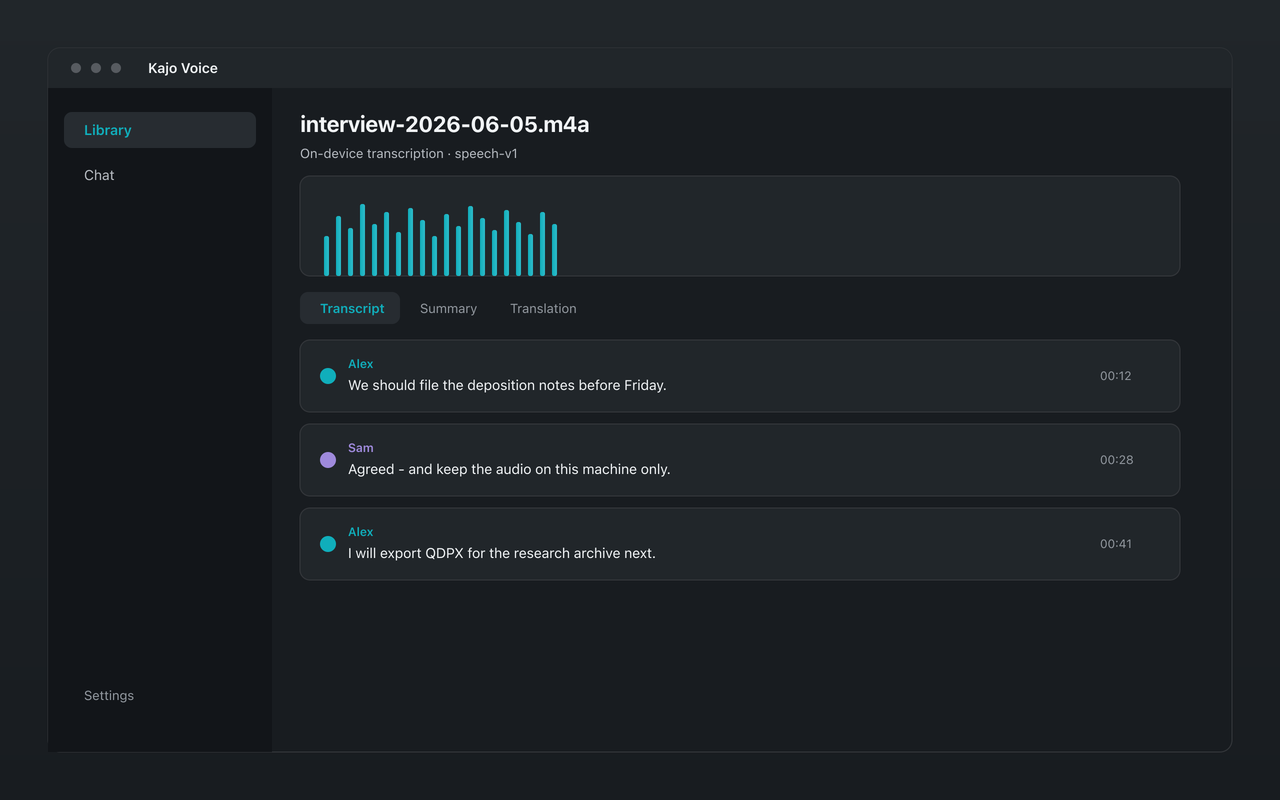
Kajo Voice interview transcript with speaker labels
Interview audio filed into a private searchable library with citations.

Authors, biographers, and documentary researchers with years of interview tape run the same archive loop: one owner, whole-archive questions, and a wipe that removes the chats too.

The jobs

Find the receipt across years of tape

Ask a cross-file question — what did this source say about the contract in 2022 versus 2025, find every time the agency named the subcontractor — and get verified quotes with timestamp jumps. Years mean when the tape was recorded: the recording date comes from the file and is editable.

Check the story against the archive

Ask whether anyone else described the same warehouse, where sources agree, and where they diverge. Evidence first: the library plus citations is how you check yourself before you publish.

Translate the interview, then ask in English

Import a foreign-language tape, transcribe it, translate it on-device, then use 'Ask this recording in English'. Quotes stay in the original language with the original timestamps. Export bilingual SRT or VTT when the piece needs subtitles.

Brief before re-approaching a source

A cited one-pager from that source's folder: what they already said, what changed, what is still unasked, and what must stay off the record.

Wipe a source yourself

After publication, or when a source is burned, deleting the recording removes the app's audio copy, transcript, search index, and every chat that only used it, and strips its citations elsewhere. Works offline; no vendor retention ticket.

Built for reporting

Source protection by architecture

Audio is transcribed on-device — sensitive source recordings never hit a cloud transcription marketplace. The custody chain stays short: your laptop, your encrypted library, your exports.

Search your whole archive

Full-text and semantic search across every interview and recording you have filed. Find the quote you half-remember without scrubbing timelines by hand.

Cited answers across sources

Ask a question across the archive and get answers with citations back to the exact recording and moment — a working knowledge base for reporting, not a transcript dump.

Encrypted at rest

Your library lives in a single encrypted database on your laptop, with the key wrapped by your OS keychain. Delete a sensitive source after publication yourself.

Works offline

Transcription, translation, summaries, and cited chat all run on-device. Field reporting on unreliable networks does not require a cloud round-trip.

Mac, Windows, and Linux

One product across three operating systems. Newsrooms and freelancers are not locked to a single desktop platform.

Kajo vs cloud transcription for journalists

Feature Kajo TurboScribe Rev
On-device (no audio upload)
Where the archive lives ✅ Your machine Your TurboScribe account (cloud) Your Rev account (cloud)
Cited chat across archive ✅ On your machine Via ChatGPT (TurboScribe GPT) Cloud only (Rev AI Assistant)
Wipe sources yourself ✅ Delete on your disk; the original file stays Files are kept while your account is active unless you delete them; purged within 90 days of account deletion Rev.com keeps files until you delete them; Rev AI API jobs are deleted after 30 days at most
Works fully offline
Linux ✅ Native app Browser only (Web app only — no desktop or mobile apps) Browser only
One-time payment ✅ $49

A reporting workflow that stays local

  1. Download Kajo for Mac, Windows, or Linux — free, no account required for the free allowance.

  2. Import interview files or point a watch folder at your recorder export directory (Lifetime).

  3. Transcribe on-device. Review the transcript, then file it into the private library.

  4. Search or chat across the archive when you need a quote, timeline, or cross-source answer.

  5. After publication, delete sensitive sources yourself — no vendor retention ticket.

Source protection is a custody problem

Cloud transcription marketplaces turn source audio into someone else’s retention policy. Even when a vendor promises deletion, the audio already crossed a network boundary and sat on infrastructure you do not control. Kajo keeps the custody chain short by construction: Transcription runs on your machine, the library is encrypted at rest on your disk, and cited chat never uploads transcript text. That is the difference between a privacy policy and an architecture.

Three reasons journalists choose Kajo

  1. Local-first / private by default

    Your audio never leaves your laptop.

    Audio is transcribed on-device — there is no cloud-processing path. Private by architecture.

  2. Cross-platform, including Linux

    Mac, Windows, and Linux — one product, three operating systems.

    Native installers for all three. Linux is a first-class target, not a port — the only local audio knowledge base that takes it seriously.

  3. Cited chat

    Ask questions across your archive — get cited answers.

    Chat with your entire library using a local model. Every answer links back to the exact moment in the recording — no copy/paste.

Free

5 files or 150 minutes of audio — total, for life. Core loop (transcribe, translate, summarize, chat), no card, no upload.

  • Transcribes 98 languages on your laptop — all on-device.
  • On-device translation and summaries — no cloud-processing path
  • Private searchable library — full-text + semantic search
  • Folder organization
  • Cited chat across your archive
  • Per-file export (SRT/VTT/TXT/MD/DOCX/PDF/QDPX and more)
  • Mac, Windows, and Linux

Lifetime — $49 once

  • Unlimited files and minutes
  • Unlimited retrieval index
  • Watch folders — auto-import new recordings
  • Batch export
  • Up to 3 machines at once

Your installed version keeps working forever.

Frequently asked questions

Does my source audio upload anywhere?

No. Transcription runs on-device. Translation, summaries, and chat run on-device too — Kajo never uploads your audio or transcript text.

How does this compare to TurboScribe or Rev?

They transcribe and forget — and your audio sits on their servers. Kajo keeps every transcript in a private library you can search and chat with, on your own machine. See /compare/turboscribe and /compare/rev.

Can I wipe a sensitive source after publication?

Yes. Deleting a recording from the Library removes its transcript, search index, and chats that only used that recording. Chats that search the entire library stay, with citations to the deleted file stripped. The original audio file on disk is not deleted — and you do not wait on a vendor retention policy.

Does Kajo work offline?

Yes. Transcription, translation, summaries, and cited chat all run on-device. Many journalists operate air-gapped or on unreliable networks — Kajo is built for that.

Can I search across years of interviews?

Yes. Every filed recording lands in the private library. Full-text and semantic search plus cited chat work across the whole archive — not one file at a time.

Source protection starts with where the audio lives.

Download free. Your whole archive, searchable and cited, on your own machine.