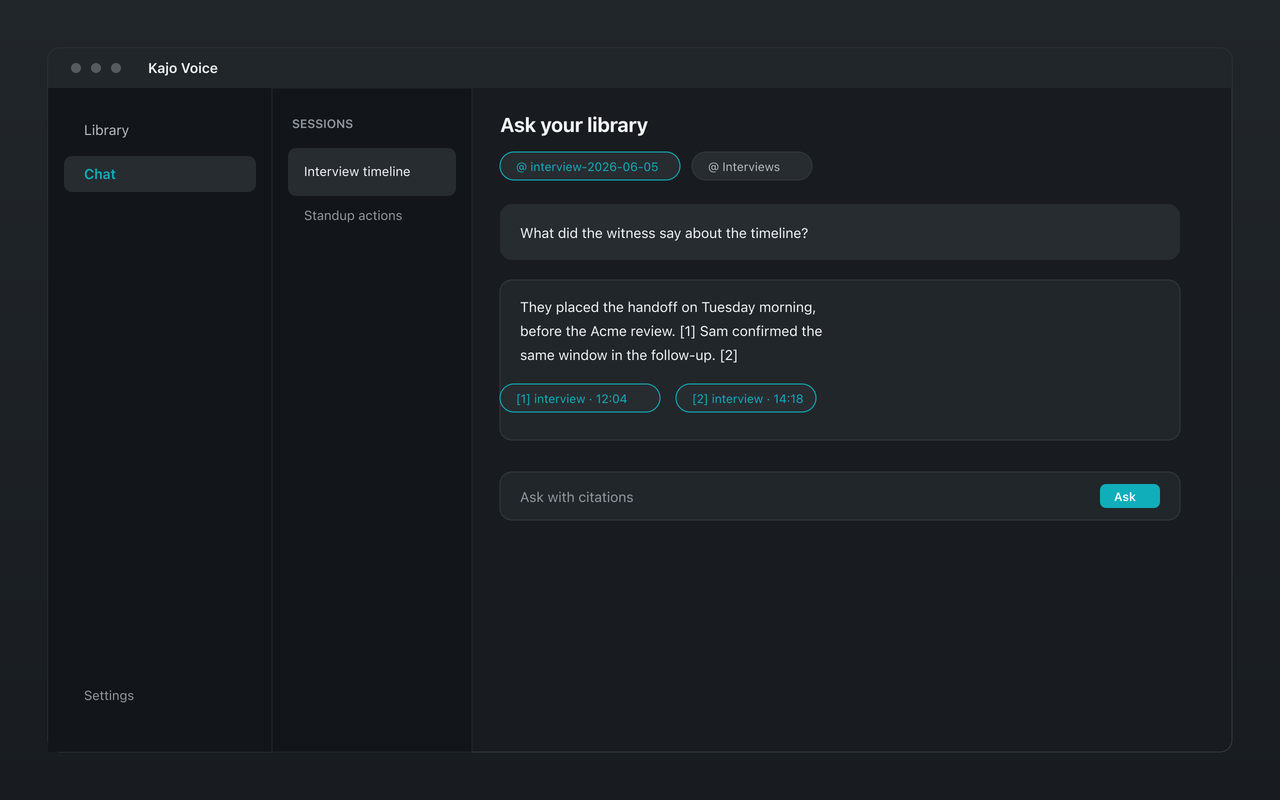
A transcript library is only half useful if you still have to remember which interview said what. The other half is retrieval: asking a question across dozens or hundreds of recordings and getting an answer you can verify. That is what cited chat is for — and in Kajo Voice it runs entirely on your machine.
This guide explains what local cited chat actually does, how it differs from generic chatbot summaries, and how researchers, journalists, and professionals use it over a private audio archive.
The problem with “search” alone
Full-text search finds keywords. It does not answer “what did participants say about trust after the second visit?” or “which expert calls raised pricing objections before the pilot?” Keyword search returns hits; you still open each file, skim, and reconstruct the answer yourself.
Cloud “AI meeting” products often solve this by uploading audio, indexing it on their servers, and answering from a hosted model. That works — until the content is confidential, IRB-bound, privileged, or simply something you do not want on someone else’s disk.
Local cited chat keeps the same retrieval idea without the upload: your archive stays on-device, the language model runs on-device, and every answer points back to the passages (and recordings) that support it.
What “cited” means in practice
When you ask a question in Kajo Chat, the app does not invent a free-floating essay about your library. It retrieves relevant passages from your transcribed archive, then the on-device Gemma 4 model drafts an answer grounded in those passages. Citations link back to the source entry so you can jump to the recording and the surrounding transcript. Quotes that cannot be found in the transcript are dropped before you see them; when the evidence is not there, the answer says “No supporting evidence in your sources” instead of inventing one; and if the question is about a speaker nobody has named yet, Kajo asks you to name the speakers first.
That citation loop matters more than flashy prose. For qualitative work, journalism, and client work, the useful output is not “AI said X” — it is “X, and here is where it was said.” If a citation looks wrong, you open the source and correct the record. The model is a retrieval assistant, not an authority.
The product loop behind the chat
Cited chat only works if the archive is real. Kajo’s loop is deliberately narrow:
- Drop in audio or video you already have
- Transcribe on-device — one engine, 98 languages — and label speakers automatically
- Optionally translate and summarize on-device with Gemma 4
- File the result into a private searchable library, in folders
- Chat with that library, with citations
There is no cloud path for your content. After the one-time model download, transcription, translation, summarization, and chat all run locally. Free covers the core loop up to 5 files or 150 minutes of audio (whichever comes first). One payment ($49 launch / $99 standard) unlocks unlimited imports and Lifetime convenience (watch folders, batch export).
How scope works
A new chat starts scoped to the folder you are standing in. Pin specific recordings or folders as sources; the pins are sticky, so follow-ups stay inside that set. With nothing pinned, chat has nothing to search — and the whole library is only ever searched through the explicit “Search entire library…” confirm. That is deliberate: mixing clients, studies, or stories by accident is the failure mode, and it is opt-in.
Six starters run against whatever is pinned — Themes, Find the quote, Quote sheet, Brief me, Who contradicted whom, Draft from citations — and dated questions (“since March”, “the last six sessions”, “2022 vs 2025”) use the recording date read from each file. Copy a quote with its citation, or export an answer to Markdown or DOCX.
How to ask questions that get useful citations
Vague prompts produce vague answers. Treat chat like a research assistant who has read your corpus but needs a clear brief.
Scope when you can. Pin the interview set or the quarter’s calls instead of the whole library.
Ask for evidence, not vibes. Prefer “list participant statements about wait times, with citations” over “summarize how people feel.” You want quotable spans, not mood.
Separate discovery from drafting. First pass: “where do people mention onboarding friction?” Second pass: “draft a short findings paragraph from those citations.” Keep drafting prompts after you trust the retrieval.
Check timestamps on multi-party audio. If a quote spans overlapping speech, the citation still points to the right moment — review the transcript and the speaker labels before you quote externally.
What cited chat is good for
Qualitative first pass. Before formal coding in NVivo or ATLAS.ti, ask thematic questions across the corpus to find candidate codes and outlier interviews. Export QDPX when you are ready for the coding suite; use chat for the scavenger hunt.
Journalistic verification. “Did anyone on the record mention the March deadline?” is faster as a cited query than scrubbing ten interview files by hand — and the citation is the jump link for fact-checking.
Professional memory. Investigators, therapists (with consent and a retention policy), and consultants accumulate years of recordings. Cited chat turns that archive into something you can query without uploading client audio to a SaaS index.
Litigation and investigations. “Who contradicted whom” across a matter folder, with the quote and timestamp for each side — it is one of the built-in starters.
What it is not
Cited chat does not replace careful reading for high-stakes claims. It does not magically fix a bad transcript — garbage in, garbage out. It is not a cloud research agent with live web access; it only knows what you have imported and transcribed locally.
It also is not a live meeting bot. Kajo works on files you already recorded (and, on Lifetime, watch folders that pick up new files on disk). The knowledge base is your library, not a subscription inbox.
Privacy and compliance angle
Because retrieval and generation stay on-device, the chat step does not create a new third-party processor for your audio. That simplifies IRB conversations, client DPAs, and internal security reviews compared to products that index speech in the vendor cloud.
You still own retention, device security, and export hygiene. Local-only architecture removes the upload risk; it does not remove the need for encrypted disks, access control, and sensible backup practices.
A practical weekly workflow
- Import new recordings into the right library folder (or let a watch folder — Lifetime — pick them up)
- Let transcription finish; skim for proper nouns and fix misses with inline edit — corrections re-index chat, no re-transcription
- Ask three to five discovery questions with citations while the project is fresh
- Export DOCX, TXT, or QDPX for downstream tools when analysis moves outside Kajo
Over a quarter, the archive compounds. The second project is faster than the first because prior interviews are already searchable — and chat can compare themes across projects when you pin the right folders.
Cost without a meter
Cloud chat-over-meetings products usually meter seats, minutes, or both. Kajo’s economics are the opposite: a free allowance for trying the loop, then one payment for unlimited imports and Lifetime convenience (watch folders, batch export). Your installed version keeps working forever; you are not renting access to your own archive month by month.