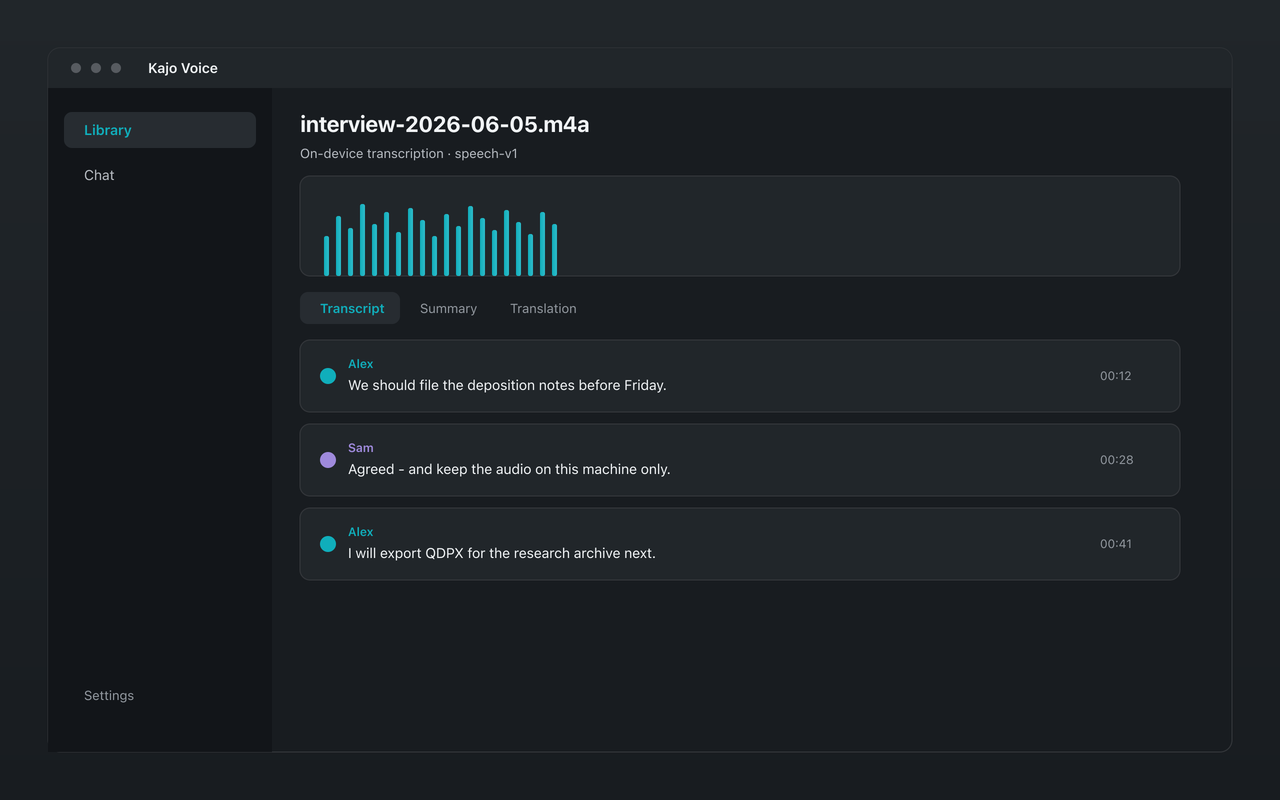
Qualitative analysis software expects text you can code. Getting from field recordings to that text is where privacy often breaks: many AI transcription tools upload audio before you ever open NVivo. Kajo Voice is built for the opposite path — transcribe on-device, then export QDPX (and other formats) for your coding suite, with no cloud processing of your content.
This guide covers what QDPX is, what Kajo puts in the bundle, and how to move from interview files to an analysis-ready project without a third-party speech processor.
What QDPX is (and why researchers ask for it)
QDPX is the REFI-QDA Project Exchange format — an open interchange standard used so qualitative projects can move between tools such as NVivo, ATLAS.ti, and MAXQDA. Researchers care about QDPX because it is a recognized handoff: transcripts and structure in a form coding software understands, without reinventing import scripts for every study.
Kajo’s .qdpx bundle holds the project file, the transcript text, one code per speaker with every turn marked at its exact start and end time, and the recording itself embedded when it is under about 2 GB (referenced by path otherwise). SRT, VTT, TXT, DOCX, JSON, CSV, Markdown, and PDF are separate exports. You transcribe locally first; the export is a file you control.
Why “local then export” beats “upload then download”
A common cloud workflow looks like this:
- Upload interviews to a SaaS transcription product
- Wait for a hosted model
- Download a DOCX or TXT
- Import into NVivo
- Hope the vendor’s retention policy matches your protocol
Even if the final coding happens offline, step 1 already shared identifiable speech with a processor. For many IRB protocols, that is the compliance event — not the later NVivo import.
A local workflow flips the order:
- Keep recordings on an approved machine
- Transcribe on-device; speaker labels are added automatically
- Review the transcript and fix proper nouns in Kajo
- Export QDPX (or TXT/DOCX/JSON) to disk
- Import into NVivo, ATLAS.ti, or MAXQDA on the same controlled environment
No audio leaves the machine for transcription. Translation and summarization, when you use them, run on-device via Gemma 4. Cited chat helps you explore themes before formal coding — still local: pin the study folder and ask it; every answer cites speaker and timestamp, and the app says so when the evidence is not there.
A research-ready export checklist
Before transcription
- Confirm the machine meets your data-handling SOP (disk encryption, access control)
- Skim site names, instruments, and domain terms on the first few files and fix misses with inline edit
- Decide the folder structure in the library (one folder per wave, site, or work package)
During review
- Fix proper nouns that will become codes or case nodes
- Rename speakers (Moderator, P1, P2…) so the QDPX speaker codes carry attribution
- Spot-check crosstalk segments on focus groups
- Confirm timestamps look sane before interchange
At export
- Choose QDPX when your destination tool expects REFI-QDA interchange
- Keep JSON if you also run custom Python or R pipelines (timestamps per segment)
- Keep DOCX or TXT for human review packets or appendices
You do not need a separate “cloud cleanup” pass. Pre-transcription audio cleanup, if you do any, should happen with tools you already trust on the same machine — Kajo’s transcription runs on-device with no hosted “enhancement” stage.
How cited chat and QDPX complement each other
NVivo is for systematic coding. Cited chat is for fast, grounded questions across the corpus before (or beside) that work:
- “Where do participants describe the intake form as confusing?”
- “List contrasts between Wave 1 and Wave 2 on staffing”
- “Find all mentions of cost alongside trust”
Use chat to build a candidate code list and to find thin spots in the sample. Then export QDPX and code deliberately. The two tools solve different jobs; neither requires uploading the archive.
Multilingual and code-switching studies
Transcribes 98 languages on your laptop — all on-device. Kajo decides a recording’s language once, from its opening, and decodes with a vocabulary that spans all of its languages — short switches usually come through as spoken; long runs in the second language are the spans to review. When you need a monolingual working copy for a bilingual team, use on-device Gemma 4 translation as a separate step — transcription stays on-device; translation does not send text to a cloud API.
Export the version your coding protocol specifies (source language, translated working language, or both as separate documents). Keep the original audio and source-language transcript as the audit trail.
Focus groups and multi-party recordings
QDA tools are only as clean as your transcript. Kajo labels speakers automatically per recording; rename them, reassign turns where detection got a passage wrong, or restore the automatic labels if an edit went sideways. Review multi-party recordings in Kajo before export so coded segments start from accurate text — you are not mass-editing inside NVivo under deadline pressure.
Heavy overlap or phone-compressed audio still needs a human review pass for focus groups; the review pass is a fraction of transcribing by hand.
Erasing a participant
When a participant withdraws, delete their recording inside Kajo: that removes the app’s audio copy, the transcript, the search index, and the chats that only used that recording. The original file on your disk is not deleted — remove it yourself under your protocol, along with any exports you made.
Cost for a typical project corpus
Rev’s human tier lists $1.99 per audio minute — roughly $3,600 for 30 hours of interviews. Cloud AI is cheaper per minute but reintroduces upload risk and often a subscription. Kajo’s free tier covers trying the loop on 5 files or 150 minutes total. For a full study corpus, one payment ($49 launch / $99 standard) unlocks unlimited imports and Lifetime convenience (watch folders, batch export) — no per-minute meter while you prepare QDPX packages for each wave.
Your installed version keeps working forever, which matters for longitudinal projects that reopen archives years later without renewing a seat. Institutional laptops need 16 GB of RAM; ≈2.2 GB of models before your first transcript (≈2.5 GB on macOS); ≈9 GB in total once the chat model finishes downloading in the background. Download once — everything runs offline afterwards.
Practical pitfalls to avoid
- Exporting before review — skim the transcript in Kajo first
- Treating chat answers as coded findings — citations are leads; codes need human judgment
- Assuming QDPX replaces your codebook — interchange moves text and structure; your analytic framework still lives in the QDA tool
- Mixing personal cloud sync with “local-only” claims — if the machine syncs the project folder to a consumer cloud drive, that is a separate policy decision outside Kajo’s processing path
Suggested pipeline for a grant-funded study
- Record on approved devices; transfer to the analysis workstation
- Batch import (within the free allowance, or unlimited on Lifetime), or aim a watch folder at the study’s intake directory (Lifetime)
- Transcribe on-device; review the transcript and the speaker labels
- Optional: cited chat for theme scouting; document prompts in the analysis memo
- Export QDPX into the NVivo project folder on the same volume
- Code in NVivo; keep Kajo as the audio-linked transcript archive for playback and re-query
That pipeline keeps speech processing local while still meeting the interchange expectations of mainstream QDA software.