OpenAI released Whisper as open-weight software in September 2022, and it transformed what was possible with local transcription. Anyone could run a state-of-the-art speech model on their own hardware — no API key, no usage fees, no data leaving their machine.
The catch: Whisper is a command-line tool. Getting it running requires Python or a compiled binary, ffmpeg, GPU drivers (or patience for CPU inference), and comfort with a terminal. The output is a raw transcript file with no speaker labels, no library, and no way to ask a question across a hundred of them.
Kajo Voice runs that same model — Whisper large-v3 turbo via whisper.cpp — wrapped in the rest of the stack you keep meaning to build: speaker labels, an encrypted library with folders, on-device translation and summaries, and cited chat, packaged for Mac, Windows, and Linux.
The raw Whisper CLI experience
If you want to transcribe interview.mp3 from a terminal, the workflow looks like this:
pip install openai-whisper
whisper interview.mp3 --model turbo --language en --output_format srt
That gives you an .srt file with timestamps and text. No speaker labels. No summary. No searchable library. No way to play the audio synced to the transcript.
For a developer running occasional transcriptions on known-format files, this is often sufficient. For daily professional use — a consultant transcribing five client calls a week, a journalist with thirty interview recordings on one story, a researcher with a wave of forty — the CLI quickly becomes a bottleneck, and the transcripts become a pile of files.
What Kajo Voice adds on top of Whisper
Speaker labels, automatically
After transcription, Kajo detects the speakers in each recording on-device and labels the turns. Rename them, reassign a passage detection got wrong, or restore the automatic labels. The names follow into exports, summaries, and cited answers. The CLI gives you one undifferentiated block of text.
A library with folders
Every transcript is filed into an encrypted local library — one folder per study, story, client, or engagement. Search across everything; filter by language, status, or starred recordings.
On-device translation and summaries
The same on-device Gemma 4 model translates transcripts into 59 languages and writes summaries — brief, bullets, or detailed, each with a review-required line — with no API key and no token bill.
Cited chat across a folder
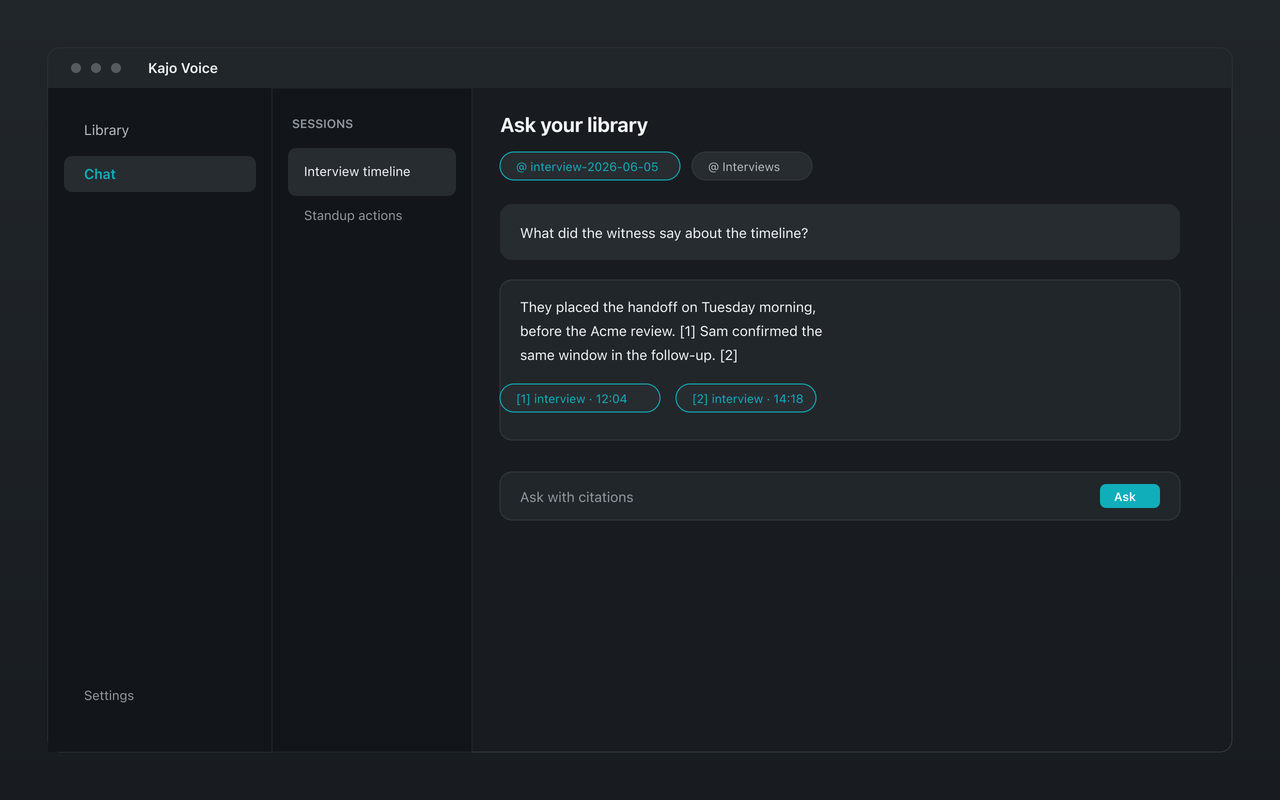
Pin a folder and ask “What did the client say about the deadline?” Kajo answers from the transcripts with citations back to the exact recording and timestamp, or says the archive does not contain it. Searching the entire library is an explicit confirm. It runs on your machine, with no cloud tier.
Exports the CLI does not write
SRT, VTT, TXT, CSV, JSON, Markdown, DOCX, PDF — and QDPX for NVivo, ATLAS.ti, and MAXQDA, with speaker codes and per-turn sync points. Bilingual SRT/VTT pair each line with its translation.
Multilingual audio
Both run the same weights, so language coverage is the same: Transcribes 98 languages on your laptop — all on-device. Kajo decides a recording’s language once, from its opening, and decodes with the model’s full multilingual vocabulary; you can pin the language in Settings when one dominates.
When the raw CLI is better
If you’re a developer who needs to transcribe files as part of an automated pipeline — a batch job on a server, subtitles generated in CI, thousands of files with your own orchestration — the CLI (or whisper.cpp / faster-whisper) is the right tool. It’s scriptable, headless, and doesn’t require a GUI.
Kajo is a desktop app: batch import, and watch folders on Lifetime, but no automation CLI or socket for scripting pipelines outside the app. For headless server work, stick with the CLI.
Model and performance
Kajo ships Whisper large-v3 turbo — the speed-optimized distillation of large-v3 — quantized to q8_0 and weighing about 834 MiB. Turbo cuts the decoder from 32 layers down to 4 while keeping the full encoder; OpenAI’s model table lists it at roughly 8× the relative speed of large-v3, and the accuracy cost is concentrated in non-English audio — on the Open Universal Arabic ASR Leaderboard, turbo lands at 33.30% word error rate against 29.87% for the full model (arXiv:2412.13788, Table 1). For an app that ships the model and holds it in memory next to a local LLM, that trade is the right one. The reasoning, and the benchmarks, are in the engine guide.
Kajo runs whisper.cpp with Metal on Apple Silicon and as a CPU build on Intel Macs, Windows, and Linux. You don’t manage any of this; the runtime is pinned per release and named on /what-runs-on-your-machine.
Cost comparison
| Whisper CLI | OpenAI transcription API | Kajo Free | Kajo Lifetime | |
|---|---|---|---|---|
| Cost | Free | Per minute, billed to your account | Free | $49 launch / $99 standard — one payment |
| Setup effort | High (Python or a build, ffmpeg) | API key + code | None | None |
| Privacy | Local | Audio sent to OpenAI | Local | Local |
| Speaker labels | No | No | Yes | Yes |
| Summaries and translation | No | No | Yes (core loop) | Yes |
| Searchable library | No | No | Yes | Yes |
| Chat with citations | No | No | Yes (core loop) | Yes |
| Watch folders, batch export | No | No | No | Yes |
The hosted API is simpler than self-hosting Python, but it reintroduces per-minute cost, network dependency, and a third-party processor. Kajo keeps the local model and adds the desktop workflow.
FAQ
What file formats does Kajo support? MP3, WAV, M4A, FLAC, AAC, OGG/Opus, MP4, MOV, and WebM (MKV via folder import). Video files are handled by extracting the audio track before transcription.
Is Kajo as accurate as running Whisper yourself? Same weights, so accuracy sits in the same band. Quantization and decode settings — voice-activity detection, beam size, thresholds — still cause small differences in the output, in either direction.
Can I use Kajo in an automation pipeline? Kajo is a desktop app focused on private, on-device transcription and a searchable library with cited chat. Use batch import inside the app (within the free allowance), and watch folders on Lifetime. For headless server pipelines, use the CLI.
The bottom line
The Whisper CLI is a foundation, not a finished tool. If you’re technical and want to build on top of Whisper, it’s the right starting point. If you want the assembled version — import the recordings you already have, then transcribe, label speakers, summarize, translate, organize, ask with citations, and export — Kajo Voice is that. Free covers 5 files or 150 minutes of audio for life; one payment ($49 launch / $99 standard) unlocks unlimited imports and Lifetime convenience (watch folders, batch export).
Both are local-first and private. The difference is everything else.