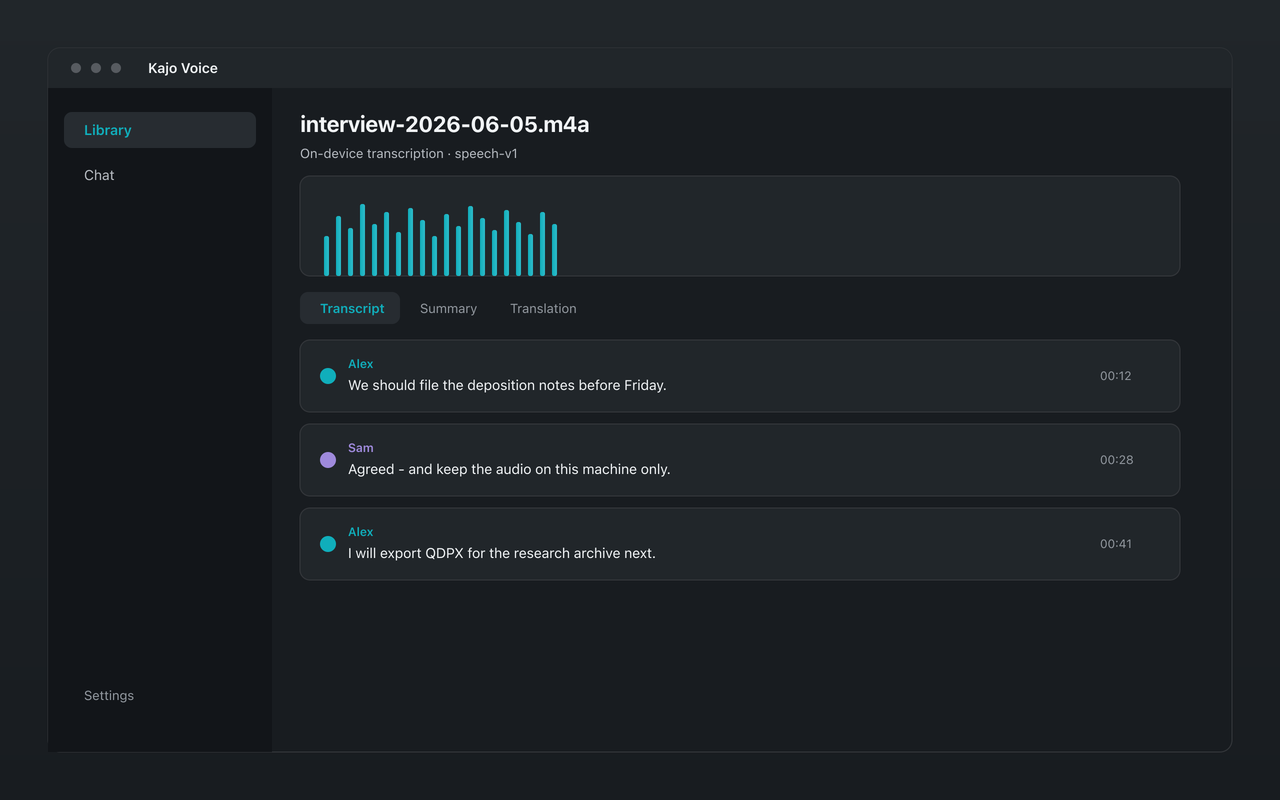
Whisper large-v3 turbo is OpenAI’s speed-optimized Whisper variant, and it’s the single on-device transcription engine in Kajo Voice. When you transcribe a recording in Kajo today, the model converting speech to text is Whisper large-v3 turbo — quantized to q8_0, weighing about 834 MiB.
This guide explains what large-v3 turbo is, how it compares to the full large-v3 model, and the honest reasoning behind this choice. If you’re a non-engineer trying to set realistic expectations for accuracy, speed, and language coverage, this is the whole picture — including the trade-offs involved.
What Is Whisper?
Whisper is a neural network model for automatic speech recognition (ASR), released by OpenAI as open source in September 2022. The name stands for Web-scale Supervised Pretraining for Speech Recognition — a description of how it was trained.
The original model was trained on roughly 680,000 hours of multilingual and multitask supervised data collected from the internet (the Whisper paper); later large-v3 training added far more weakly-labelled and pseudo-labelled audio (OpenAI’s README). That scale is far larger than previous open-source ASR models, and it’s a primary reason for Whisper’s accuracy advantage. The diversity of that data — different speaking styles, recording environments, accents, and languages — gives the model robustness to real-world audio that earlier systems lacked.
Whisper is a transformer-based sequence-to-sequence model: audio in, text out. Unlike traditional ASR systems that bolted together separate acoustic, pronunciation, and language-model components, Whisper handles all of it in a single end-to-end model.
The Whisper Model Family: Understanding the Variants
OpenAI released Whisper in multiple sizes, trading accuracy against computational cost. The naming convention:
- tiny — smallest, fastest, least accurate (~39M parameters)
- base — small and fast, moderate accuracy (~74M parameters)
- small — good accuracy, reasonable speed (~244M parameters)
- medium — strong accuracy, moderate compute (~769M parameters)
- large — highest accuracy in the original release (~1.5B parameters)
- large-v2 — improved large model (same size, better training)
- large-v3 — further improved, same size; strong accuracy leader
- large-v3-turbo — a speed-optimized distillation of large-v3
The last two are where every serious local-transcription decision gets made today, so they deserve a proper comparison.
What Whisper Large-v3 Turbo Actually Is
Large-v3 turbo (sometimes written large-v3-turbo, or just “turbo”) is the most recent addition to the family. It is not a new, more capable model — it’s a pruned version of large-v3. OpenAI took the full model and cut the decoder from 32 layers down to 4, then fine-tuned what remained (model card).
That single change is the entire story:
- It’s fast. Most of Whisper’s runtime cost is in the decoder, so cutting it to an eighth of its depth makes turbo much faster — OpenAI’s model table lists it at roughly 8× the relative speed of large-v3.
- It’s smaller. The q8_0-quantized turbo weights are about 834 MiB, versus around 3 GiB for the full large-v3 in GGML format. That’s a ~3.6× size reduction — meaningful for an app that ships the model as part of its download.
- It costs some accuracy. A shallower decoder has less capacity. On clean English audio the gap is tiny — often within noise. For non-English languages the gap is larger, but turbo still delivers strong accuracy across the 98 languages Kajo exposes.
Why Kajo Ships Large-v3 Turbo
The choice comes down to the on-device constraint. Kajo Voice runs entirely on your machine — there is no cloud fallback. That means the model has to be practical to ship, download, and keep in memory on the hardware real users own today.
~834 MiB (q8_0) vs ~3 GiB. The full large-v3 costs 3.6× more disk space and memory. On a 16 GB machine shared between the OS, the Kajo app, a local LLM, and whatever else is running, that difference matters. The turbo model fits comfortably alongside the rest of the on-device stack; the full model puts real pressure on RAM.
Roughly 8× the decoding speed. On Apple Silicon, where Kajo runs the model with GPU acceleration, the wait is usually the model download rather than the transcript. On CPU-only machines — Intel Macs, most Windows and Linux laptops — turbo’s speed advantage over the full model is what keeps batch transcription practical at all.
Accuracy is still strong. Turbo is marginally less accurate than full large-v3 on multilingual benchmarks — the gap is real but small. The Arabic leaderboard is the worked example: 33.30% WER for turbo against 29.87% for large-v3 across dialect-heavy sets (arXiv:2412.13788, Table 1). For interviews, depositions, client calls, and field recordings, turbo delivers results you can use with normal review.
The translation job is separate. One place the full large-v3 has a structural advantage over turbo is its cross-lingual training: it was trained for transcript-level translation. But Kajo handles translation through its on-device Gemma 4 model, not through the ASR engine. So turbo’s lack of that training path is irrelevant — translation is a separate step that doesn’t touch the Whisper decoder.
ASR quality is weight-bound, not runtime-bound. A faster runtime doesn’t make a model less accurate — the accuracy lives in the weights. Turbo’s pruned decoder is the right architectural trade when size and speed matter; in Kajo, translation rides the same on-device Gemma 4 session rather than a separate translation model.
Dual decode profiles around the same weights. Speech and singing need different Whisper flags: meetings use Silero VAD and light speechnorm; songs turn VAD off and isolate context so sung vocals are not stripped as “music.” Kajo auto-detects with on-device OmniAED, then runs one turbo decode under the matching profile — still the same large-v3 turbo weights, never a cloud cleanup stage.
How Large-v3 Turbo Achieves Its Accuracy
Several architectural choices account for the model’s strong performance despite the shallower decoder:
Encoder depth preserved. Turbo keeps the full large-v3 encoder — all of its capacity for building rich audio representations is intact. The pruning targets the decoder only. The encoder is where most of Whisper’s multilingual robustness comes from, so preserving it is the right call.
Fine-tuned after pruning. OpenAI didn’t just chop the decoder — per the model card, the remaining four layers were trained for two more epochs on transcription data only, so the model learned to compensate for the reduced depth. The result is better than a naive pruning would suggest.
Large-scale training data diversity. The underlying 680,000 hours of training span many sources, recording conditions, languages, and speaking styles. That diversity is baked into the encoder weights that turbo retains in full.
Accuracy Benchmarks: What to Expect
Whisper’s accuracy is measured with Word Error Rate (WER) — the percentage of words that differ from a ground-truth reference. Lower is better.
Turbo is marginally less accurate than full large-v3 across most benchmarks, with the gap smallest on clean English audio and somewhat larger on multilingual and noisy audio. OpenAI publishes the per-language numbers — WER on Common Voice 15 and FLEURS for every model size — in its README; that chart is the honest map of where the model is strong and where it is not.
Kajo publishes no benchmark of its own yet. The free allowance is your benchmark: transcribe ten minutes of your own audio and count the corrections — see what accuracy to expect and how to check it.
Comparing Whisper Variants for Different Use Cases
| Use case | Best fit | Reason |
|---|---|---|
| On-device transcription with fast results (what Kajo optimizes for) | large-v3 turbo | ~8× relative speed, ~834 MiB, strong accuracy, fits the on-device stack |
| Maximum accuracy at any cost, server inference | large-v3 (full) | Highest accuracy, ~3 GiB, slower |
| Rapid draft transcription on weak hardware | small or medium | Faster, smaller, acceptable on easy audio |
| Near-real-time / streaming | tiny or base | Fast enough for low-latency use |
| Very limited storage | small | Much smaller model file |
For Kajo’s users — professionals who want accurate on-device transcription without sending audio to a cloud — turbo is the right call on the dimensions that matter: speed, size, and accuracy that satisfies real workflows.
Language Performance by Region
Turbo’s accuracy across the 98 languages Kajo exposes is not uniform — it performs best where it had the most training data, inheriting that from the full large-v3 it was distilled from. OpenAI’s per-language WER chart (Common Voice 15 and FLEURS, in its README) is the map: English, Spanish, and the major European languages sit near the top; Arabic, Hindi, and many Asian languages further down; low-resource languages and heavily dialectal speech at the bottom. For Arabic specifically, the independent leaderboard above is the better reference.
What Whisper Cannot Do
Accurate expectations require naming the limits — and these apply to turbo just as they would to the full model:
Multi-party conversations. Multi-speaker audio is harder for Whisper — overlapping talk and turn-taking raise error rates. Kajo runs on-device speaker diarization after speech transcription (skipped for lyrics/sung material), labels turns per recording, and carries those names into exports, summaries, and cited chat. Review multi-party transcripts against the audio when attribution matters.
Real-time transcription. Whisper processes audio in chunks and works best on complete recordings. True word-by-word live transcription needs a different architecture. That’s not a limitation for Kajo, which works on recordings you already have — you import a finished audio or video file and Kajo transcribes the whole thing locally.
Transcript-level translation. The full large-v3 has some cross-lingual translation training; turbo’s pruned decoder gives up most of that. Kajo handles translation through its on-device Gemma 4 model rather than the ASR engine, so this architectural difference has no practical impact in Kajo.
Prosody and paralanguage. The transcript captures words, not tone, emotion, pitch, or pace. A sarcastic line and a sincere one transcribe identically.
Very long single tokens. Whisper works in 30-second internal windows; very long uninterrupted speech without pauses can occasionally produce alignment hiccups at window boundaries.
FAQ
Which Whisper model does Kajo actually run? Whisper large-v3 turbo (q8_0, ~834 MiB) — the speed-optimized, distilled variant of large-v3. It downloads once on first setup and then runs entirely on your machine.
Why not the full large-v3? The full large-v3 is approximately 3 GiB and notably slower. On a machine running the full Kajo on-device stack — transcription, embeddings, and local LLM — the extra size and speed cost is not worth the marginal accuracy gain for typical professional transcription workflows.
Is large-v3 turbo in Kajo the same model OpenAI released? Yes — the same weights, quantized to q8_0 for efficient on-device inference. Accuracy sits in the same band as any other tool running the same turbo weights; quantization and decode settings (voice-activity detection, beam size, thresholds) still cause small differences in the output.
Which model will Kajo run next year? Kajo pins exactly one model per release and lists it on /what-runs-on-your-machine. Whatever ships next, your installed version keeps working forever.
Conclusion: Production-Grade On-Device Speech Recognition
Whisper large-v3 turbo is a thoughtfully engineered model: it preserves the full encoder that carries Whisper’s multilingual accuracy, prunes the decoder for roughly 8× the relative speed and ~3.6× smaller size, and fine-tunes the result to recover accuracy. For on-device transcription — where model size and inference speed genuinely constrain what’s practical — turbo is the right pick.
Running it locally — as Kajo Voice does — means transcription across 98 languages, all on your own hardware, with no audio ever leaving your machine.
Understanding the model helps you use it well: know its strengths (broad multilingual accuracy, fast on-device inference, robustness to messy audio), know its limits (dialect variation, overlapping multi-party audio, transcript-level translation handled separately), and set realistic expectations for the review work that professional transcription always involves.
When to run the model yourself instead
Whisper is open-weight, and whisper.cpp runs the same turbo weights from a terminal for free. Use the CLI when you want a one-off transcript on a machine you already administer, need to script a batch, or want to change decode flags Kajo does not expose. Use Kajo when the transcript is the start of something: automatic speaker labels, a library with folders, on-device translation and summaries, cited chat across a folder, and exports including QDPX — packaged for Mac, Windows, and Linux with no Python to maintain. Either way the audio never leaves your machine.
- Free — 5 files or 150 minutes of audio (total, for life), the same on-device model, no card
- Lifetime — one payment ($49 launch / $99 standard) unlocks unlimited imports and Lifetime convenience (watch folders, batch export)