Most polished voice-AI desktop apps treat Linux as an afterthought — or skip it. Researchers, journalists, and engineers who live on Linux end up stitching command-line ASR scripts, ad-hoc Python environments, and copy-paste into editors. That works until you want a real library, exports, and cited chat without maintaining a science project.
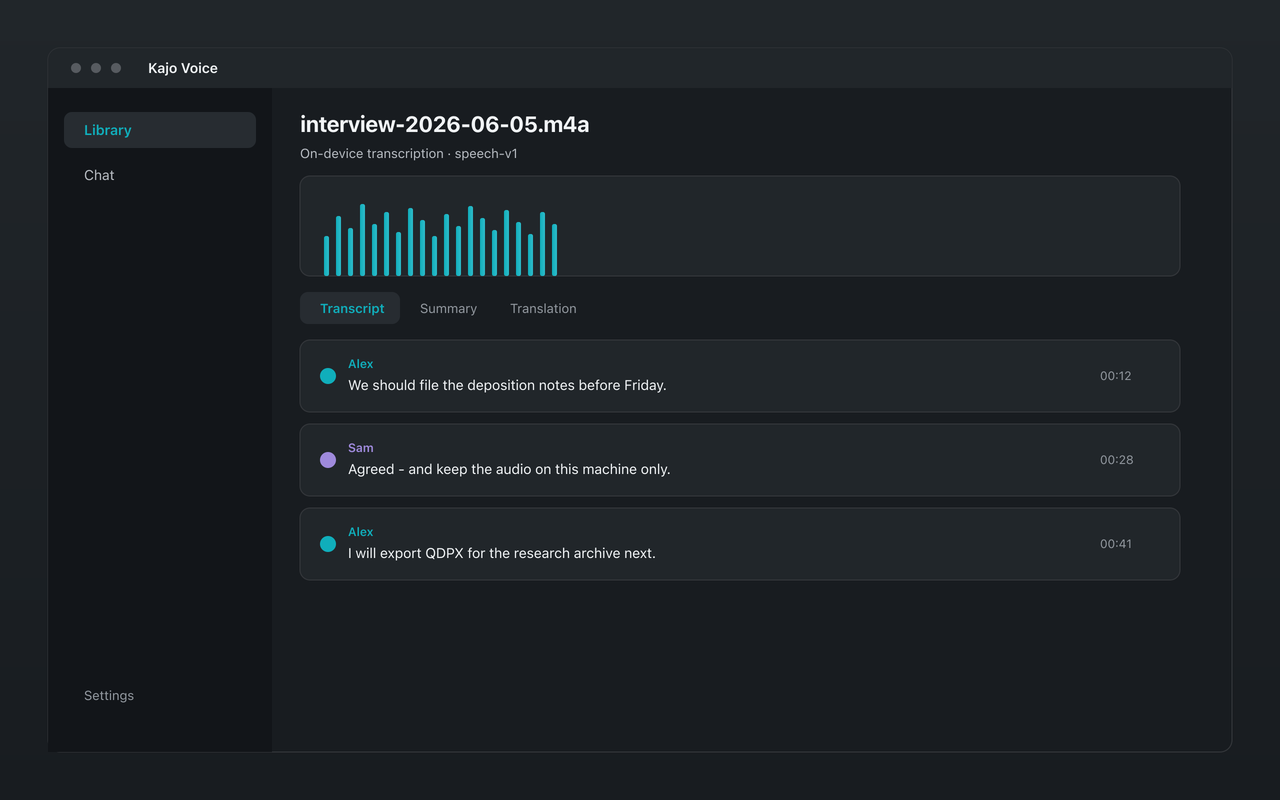
Kajo Voice ships a Linux desktop build for the same local-first loop available on Mac and Windows: import audio or video, transcribe on-device with speaker labels, summarize, translate, and chat with on-device Gemma 4, and keep everything in a private searchable library. Every release ships .deb, .rpm, AppImage, and tar.gz for x86_64 and ARM64.
Why Linux users get stuck with CLIs
The open-source ASR ecosystem is excellent on Linux. whisper.cpp, faster-whisper, and related tools run well. What they do not give you out of the box:
- A durable encrypted library of recordings and transcripts
- Folder organization for multi-year archives
- Automatic speaker labels per recording
- Cited chat over a folder with a local LLM
- One-click exports (SRT, DOCX, QDPX, and the rest of the format list)
You can assemble those pieces. Many people do. The cost is time, glue code, and a workflow that is hard to hand to a non-engineer collaborator on the same study.
What “desktop transcription on Linux” should mean
A serious Linux transcription app should:
- Run inference locally (no mandatory upload)
- Use a current, known engine, named in public (in Kajo: one engine, listed on /what-runs-on-your-machine)
- Persist results in a local database you control
- Support batch import; watch folders for archive intake (Lifetime)
- Export to formats other tools understand
- Work offline after the models are present
Kajo is aimed at that checklist. It is not a terminal wrapper with a thin skin — it is the same product loop on Linux as on other desktop platforms.
Hardware expectations
On Linux, transcription runs on the CPU — Kajo’s Linux build has no GPU path for the speech model — so plan on slower-than-real-time transcription and queue batches. The chat model can use a GPU through its own runtime.
- RAM: 16 GB minimum. Transcription, embeddings, speaker labels, and Gemma 4 12B share the machine — 16 GB is the product floor, not a comfort recommendation.
- Disk: ≈2.2 GB of models before your first transcript (≈2.5 GB on macOS); ≈9 GB in total once the chat model finishes downloading in the background. Download once — everything runs offline afterwards.
Exact throughput varies by CPU generation and thermal limits. The same model produces the same transcript on Linux as on macOS; only speed changes.
A Linux-native archive workflow
Intake. Keep a project directory on disk (~/research/study-a/incoming). Import manually or enable a watch folder (Lifetime) so new exports from your recorder land in the library without a ritual.
Transcribe. Queue files; transcription and automatic speaker labels run locally. For a big batch, skim the first few files for recurring proper nouns so you know what to watch for in review.
Review. Skim proper nouns and speaker labels. Edit segments inline when a term was missed — corrections re-index chat, and transcription is one-shot after filing (use “Transcribe with different profile…” only to switch between speech and sung vocals).
Analyze. Pin the folder and use cited chat for questions across it. Export QDPX, TXT, or JSON into your analysis toolchain (NVivo on another machine, Python on the same box).
Retain. Back up the library volume with whatever Linux backup tool your security policy already trusts. Local-first does not mean “no backups” — it means the transcription vendor is not your backup.
Privacy on multi-user and lab machines
Linux deployments in labs often share hardware. Local-only transcription still requires OS-level access control: encrypted home directories, correct permissions on the data directory, and clear rules about who can log in. Kajo removes the cloud speech processor; it does not replace chmod, disk encryption, or institutional endpoint policy.
For air-gapped or high-security networks, download the models on a connected machine, export them as a zip from Settings → Models, import the zip during Setup on the air-gapped box, and operate offline. Transcription, translation, summaries, and chat do not need the internet once the models are installed. One honest caveat: the Lifetime unlock is validated against the licence server when the app is online and keeps working for at least 30 days offline after the last check; a machine that never connects runs Kajo Free.
How this compares to “just use the CLI”
Use the CLI when you are building a headless pipeline, embedding ASR in a custom server, or scripting thousands of files with your own orchestration. Use Kajo when the job is a human-facing archive: browse, search, chat with citations, export for collaborators who will never touch ffmpeg flags. See Kajo vs the CLI.
You can still keep CLI tools for specialized batch jobs and use Kajo for the knowledge base you actually query day to day. They are complementary, not mutually exclusive.
Pricing without a Linux surcharge
There is no separate “Linux edition” tax. Free includes the core loop up to 5 files or 150 minutes of audio total. One payment ($49 launch / $99 standard) unlocks unlimited imports and Lifetime convenience (watch folders, batch export) on the desktop app you already run. Your installed version keeps working forever — useful when grant machines outlive SaaS subscriptions.
Common Linux questions
Does local transcription require a browser profile or account login to process audio? No. Processing is on-device. Licensing is separate from inference.
Can I use this for multilingual fieldwork? Yes. Transcribes 98 languages on your laptop — all on-device. Translation is on-device Gemma 4 when the team needs a working language.
Is there a mobile companion requirement? No. Kajo’s product surface is the desktop app and your files.
Bottom line
If your daily driver is Linux and you are tired of choosing between uploading to a Mac-centric SaaS and maintaining a personal ASR lab, a real desktop app that never uploads is the missing middle. Start with a sensitive file you would not put in a cloud notepad, confirm offline behavior, then grow the library with watch folders (Lifetime) as the archive accumulates.