Qualitative research generates enormous quantities of audio. A single research project might involve 30 semi-structured interviews of 45 minutes each — that is 22+ hours of audio that needs to become searchable, codeable text.
Researchers have historically faced a difficult tradeoff: pay significant per-minute rates for human transcription (accurate, expensive, slow), or use cloud AI services (cheaper, faster, but with privacy concerns that conflict with IRB protocols).
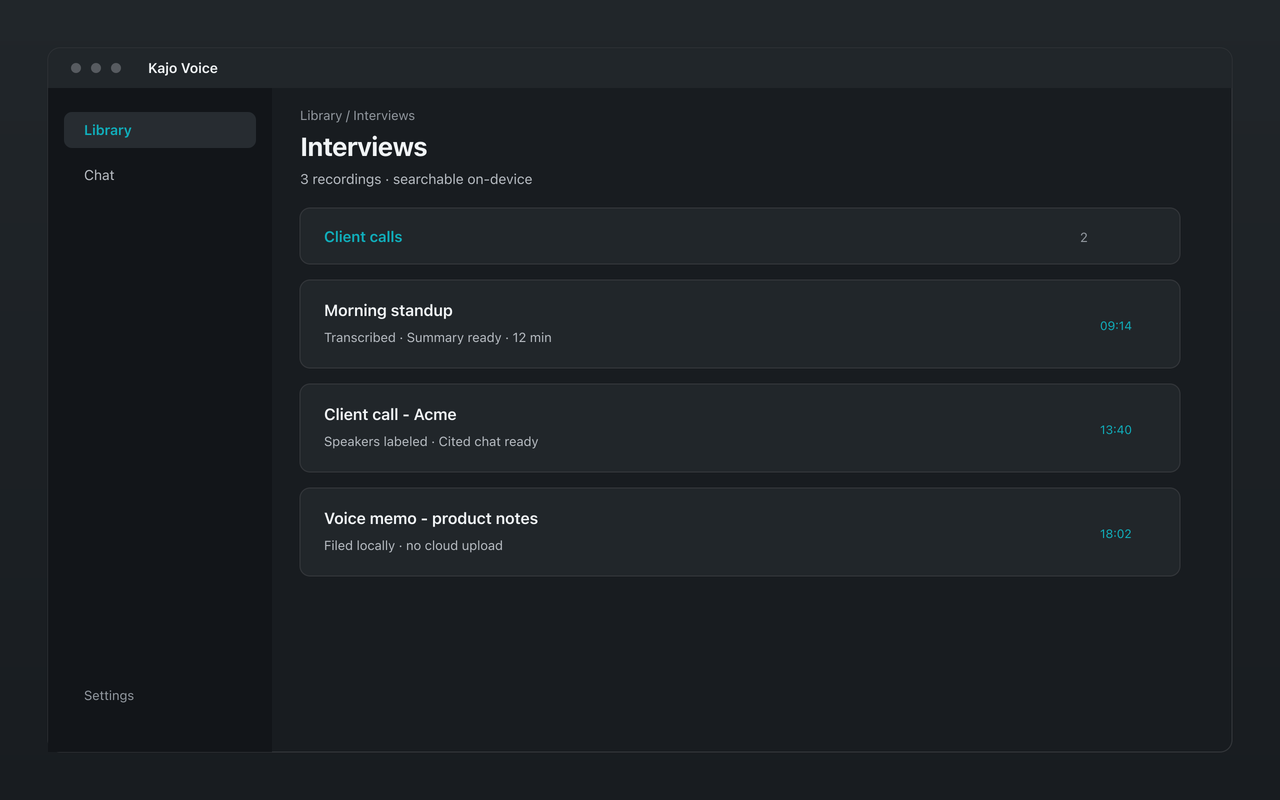
Kajo Voice offers a third path: a local-first audio knowledge base. Transcribe on your own machine, label speakers, ask the study folder with citations, and export QDPX — without audio ever leaving the research environment.
IRB and confidentiality considerations
Most IRB-approved qualitative research protocols require that participant recordings be kept confidential — accessible only to members of the research team. When a recording is uploaded to Otter.ai, Notta, or a cloud transcription API, participants’ data leaves the controlled research environment without participant knowledge or consent.
This is a genuine IRB compliance issue. Some institutions have specifically prohibited the use of cloud transcription services with identifiable research recordings.
Kajo Voice addresses this at the architectural level: the audio stays on your machine and the model runs locally. If you watch the network while a file transcribes, you will see no audio or transcript leave — the only traffic Kajo makes is licence validation and, unless you opt out, crash reports. This means you can confidently represent to your IRB that recordings were not shared with third parties during transcription.
For research involving especially sensitive populations (minors, undocumented individuals, crime victims, individuals with mental health conditions), this is not just about compliance — it is about protecting participants.
Multilingual research and code-switching
Qualitative research is inherently multilingual. A study of immigrant communities might involve Spanish-dominant speakers who code-switch into English. A cross-national comparative study might involve recordings in five different languages.
Transcribes 98 languages on your laptop — all on-device. The full list is on /transcribe.
Mid-conversation language switches matter for sociolinguistic research. Kajo decides a recording’s language once, from its opening, and decodes with a vocabulary that spans all of its languages — so when a speaker shifts from Arabic to French mid-sentence (a common pattern in North African communities), short switches usually come through as spoken, while long runs in the second language are the spans to review. There is no separate code-switching product layer; if one language dominates, set it in Settings → Transcription.
Focus groups and multi-party interviews
Focus groups, triadic interviews, and household interviews can involve many participants. Kajo transcribes the full session locally and labels speakers automatically per recording. Rename them (Moderator, P1, P2…), reassign turns where detection got a passage wrong — Fix speakers takes a multi-select — or restore the automatic labels if an edit went sideways. The names follow into exports, summaries, and cited answers.
The output is a timestamped, speaker-labelled transcript you can review, correct, and export to your QDA toolchain.
The transcript library as a research corpus
Every interview you transcribe in Kajo is stored in an encrypted local database, filed into folders — one per study, wave, or site. Pin the study folder in chat and ask it: “What did participants say about trust in medical institutions?” The Themes starter answers with a true count of recordings and a quote per claim; “Find the quote” lands on the moment; and when the archive does not say, the answer says so instead of inventing one. Searching the entire library is an explicit confirm, never the default.
This does not replace qualitative coding software like NVivo, ATLAS.ti, or MAXQDA — but it is a fast, grounded first pass for identifying patterns before manual coding.
Export formats for qualitative analysis
Kajo exports in formats that integrate with qualitative research workflows:
- TXT: plain text, easy to import into coding software
- DOCX: formatted document with timestamps
- JSON: structured data with start and end timestamps per segment, ideal for custom analysis scripts
- CSV / Markdown / PDF: spreadsheet, Markdown, and PDF handoffs
- SRT/VTT: timestamped subtitle format, useful for synchronized playback
- QDPX: REFI-QDA interchange that imports into NVivo, ATLAS.ti, and MAXQDA — see QDPX export without the cloud
The JSON export is useful for researchers building custom analysis pipelines in Python or R. Each segment is a separate object with start time, end time, speaker, and text — making it straightforward to compute turn-taking patterns or feed into NLP pipelines.
Fixing domain terms after the first pass
Research in specialized domains has dense jargon. A study of emergency medicine might involve “intubation,” “ACLS,” “tachyarrhythmia.” A study of software engineers might involve “pull request,” “kubectl,” “Kubernetes.” A study of agricultural communities might involve local crop names, equipment brands, and practices.
After the first few interviews, skim for recurring site names and instruments and fix misses with inline segment edit; corrections re-index chat without re-transcribing, so the rest of the project stays searchable and export-ready.
Workflow for a typical qualitative study
- Setup: Note participant pseudonyms, site names, and local terminology you will watch for in review
- Batch transcription: drop all interview files into the study folder; they queue and process one at a time
- Review: scan transcripts in Kajo’s viewer; correct names and technical terms; star recordings you need to revisit
- Export: JSON for custom analysis, DOCX for manual review, QDPX for the coding suite
- Corpus queries: pin the study folder and use cited chat for initial pattern identification
- Consistency pass: re-check early interviews once preferred spellings are settled so the full corpus matches
This workflow compresses the time from field recording to analysis-ready transcript from weeks (with human transcription services) to however long your machine takes to process the files.
Erasing a participant
When a participant withdraws, delete their recording inside Kajo: that removes the app’s audio copy, the transcript, the search index, and the chats that only used that recording. The original file on your disk is not deleted — remove it yourself under your protocol, along with any exports you made.
Note on voice anonymization
Some research protocols require that audio be modified to remove identifiable voice characteristics before archiving. Kajo does not provide voice anonymization — that is a separate preprocessing step. Some researchers combine Kajo with voice anonymization tools before sharing transcript archives.
Cost for research use
A single researcher transcribing 30 hours of interviews:
- Rev’s human transcription is $1.99 per audio minute — about $3,600 for 30 hours
- Rev’s AI plans meter by month and seat: Free 45 AI minutes/month; Essentials $29.99/seat/month ($25.49 billed annually); Pro $59.99/seat/month ($47.99 billed annually)
- Kajo Lifetime: one payment ($49 launch / $99 standard) unlocks unlimited imports and Lifetime convenience (watch folders, batch export) — no per-minute meter, and your installed version keeps working forever
A one-time purchase removes the per-project transcription cost entirely — making it economically trivial to transcribe all your audio rather than sampling. Institutional laptops need 16 GB of RAM; ≈2.2 GB of models before your first transcript (≈2.5 GB on macOS); ≈9 GB in total once the chat model finishes downloading in the background. Download once — everything runs offline afterwards.